


This issue includes:
- Full Customization of AV Remote Control: Turning a Remote into the Perfect Tool for a Conference Room;
- iRidi Pro Specialist course;
- Outdoor Stealth Home Theater on iRidi.
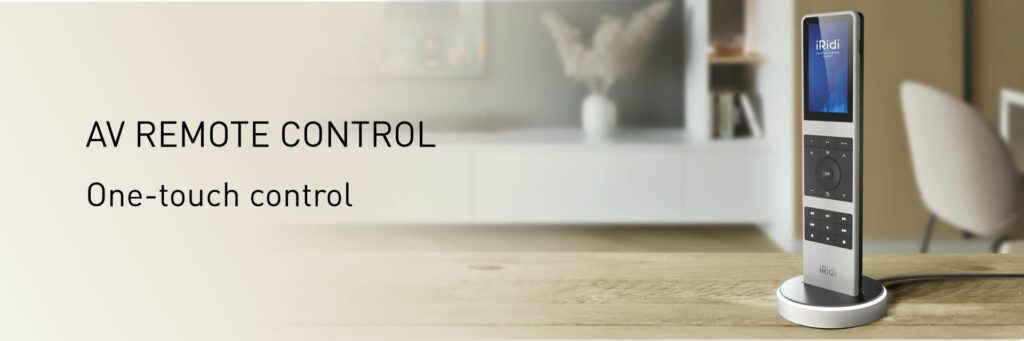
Full Customization of AV Remote Control: Turning a Remote into the Perfect Tool for a Conference Room
A standard control remote is always a compromise. It is either too complicated, with dozens of unnecessary buttons, or it lacks the functionality required for the specific tasks of a particular room.
AV Remote Control by iRidi breaks this stereotype by offering integrators not just a remote, but a powerful and flexible tool that can be tailored to any ProAV project – even the most complex one.
Let’s take a closer look at how iRidi Studio can turn it into an ideal solution for a conference room.
1. Graphical Interface: Only What You Need, Exactly How You Need It
What you can do in iRidi Studio:
- Create a branded interface
Use the client’s logo and corporate colors. This increases the perceived value of your solution in the eyes of the customer. - Develop one-touch scenarios
Instead of a sequence of actions such as “turn on the projector”, “lower the screen”, and “select HDMI 2”, create one large “Start Presentation” button. All the complex logic will be handled by iRidi Pro Server. - Adapt the graphics to the room lighting
For rooms with dimmed lighting, such as cinema rooms or lecture halls, you can use a dark color scheme that will not glare or distract the user. - Use any custom graphics
Upload your own icons, backgrounds, and even animations to make the interface not only functional, but also intuitive and easy to use.
2. Button Logic: Every Key Works for Your Project
The remote features 23 backlit physical buttons, including a joystick and scenario keys. The key advantage is that their behavior is fully programmable.
Examples of logic customization:
- Button press capture
In iRidi Studio, you can capture the press of any hardware key — even volume or navigation buttons — and assign a custom action to it. For example, a long press on the “Mute” button can turn off not only the audio output, but also all microphones in the room. - Scenario buttons
Assign the most frequently used actions to the three scenario buttons: “Start Video Conference”, “Share Laptop Content”, or “End Meeting”. This eliminates the need for users to navigate through on-screen menus. - Joystick control for PTZ cameras
In video conferencing mode, the joystick can be used not for menu navigation, but for direct camera pan, tilt, and zoom control. - Built-in IR emitter
Even if the room contains equipment without IP control, such as an older Blu-ray player, you can teach the remote its IR commands directly in iRidi Studio and control it as part of the same system.
3. Feedback: A System That Communicates with the User
A reliable control system must provide clear feedback. The user needs to be sure that the command has been executed.
How this is implemented in AV Remote Control:
- Two-way data exchange
iRidi allows you not only to send commands, but also to receive device statuses. The remote display can show the current volume level, projector status, such as on or off, or the currently selected source. - Status visualization
Assign two states to the “Microphone” button. If the microphone is active, the button lights up red. If it is off, it lights up green. This simple solution helps avoid awkward situations during meetings. - Dynamic interfaces
The entire screen can change depending on the equipment status. For example, while the projector is warming up, the remote can display the message “Please wait…”. Once the projector is ready, the source selection screen opens automatically.
To learn more about the capabilities of the universal AV Remote Control, please contact your manager.
Email: contact@iridi.com
Become an iRidi Pro Specialist
iRidi Pro Specialist course starts on July 17. You will learn how to create your first automation project in iRidi Studio 2019 and master basic functions required for your future work.
Besides, you can create stylish visualization interfaces and integrate various equipment in one project. Be the best in your business – bring your customers’ ideas to life and create projects of any complexity!
The course lasts 3 weeks.
- the lessons in the format of video;
- practical tasks;
- feedback from a trainer.
After you complete the course and pass the final test, you get an iRidi Pro Specialist certificate. You have unlimited access to all video lessons.
Bonuses after the course:
- AV interface;
- 2 interface templates: Classical Black edition and Classical White edition;
- 2 interfaces to choose from the list: iOS 13 Black Edition, iOS 13 White edition, Flex 2 in 1.
If 3 weeks is too long for you, there is the faster course. Follow the link and register. Become the best in your business!
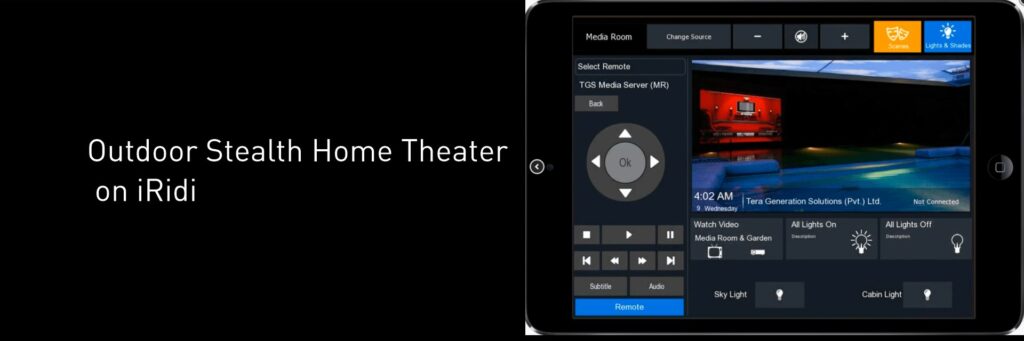
Outdoor Stealth Home Theater on iRidi by Tera Generation Solutions Pvt. Ltd.
An individual project completed in Lahore, Pakistan by Tera Generation Solutions Pvt. Ltd.
Project Story
This project was created for a client who wanted to bring the full cinema experience outdoors without turning the backyard into a visible technology zone. The goal was not only to install a high-performance AV system, but to make it almost invisible — fully integrated into the landscape, protected from outdoor conditions, and easy to control.
Tera Generation Solutions designed a stealth outdoor home theater where powerful engineering, premium AV equipment, surround sound, projection technology, and automation work together to create an impressive entertainment environment right in the client’s backyard.
Client’s Objectives
The client wanted an outdoor entertainment space that could deliver the atmosphere of a real movie theater while preserving the aesthetics of the property. The system had to provide dynamic full-range multi-channel surround sound, a high-quality projection experience, reliable outdoor operation, and discreet equipment placement.
Project Description
Entertainment lifestyles are increasingly moving outdoors. To support this concept, Tera Generation Solutions combined advanced engineering with carefully selected hardware to recreate a cinematic experience in the client’s backyard.
The system was custom-designed to meet functional, environmental, acoustic, and aesthetic requirements. A customized media server feeds the Panasonic 2K Full HD high-lumen large venue projection system, delivering a bright and immersive visual experience.
An ultra-quiet projector lift mechanism conceals the projector securely inside a weatherized assembly when it is not in use, helping preserve both the system’s safety and the clean visual appearance of the outdoor area.
iRidi in the Project
iRidi was used as part of the control system, providing wireless handheld control through the iRidium app. This allowed the client to manage the outdoor home theater system conveniently and intuitively from a mobile device.
Together with the LINA wall panel and other control interfaces, iRidi helped create a flexible control environment for the AV equipment and automation system.
Project Challenges
The most challenging part of the project was achieving a true 9.2 surround sound configuration in an outdoor environment. Plants, surfaces, and landscape fixtures were used as sound diffusers to improve overall acoustics and sound distribution.
The equipment layout required several adjustments during the project. At the same time, one of the key requirements remained unchanged: the entire system had to stay fully concealed.
Another important challenge was the placement and protection of AV equipment. Since the installation was located close to a large waterbody, all equipment had to be secured in a hidden, humidity-free environment.
Best wishes,
iRidi team